

本节课,我们将实现一个”名言轮播”的功能,并深入学习数组(Array)和条件判断语句(if-else)等 Swift 基础知识。
我们将展示如何保存多个名言,并通过按钮交互实现名言的循环轮播。
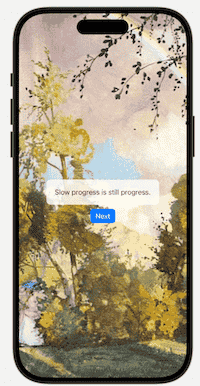
显示名言
首先,我们需要在 SwiftUI 中显示一条名言。
最简单的方式是使用 Text 视图:
Text("Slow progress is still progress.")这个代码只能显示一条固定的名言。如果想要展示多条名言并实现切换功能,我们需要将名言保存起来。
但是,常规的字符串变量只能保存一条名言:
let sayings = "Slow progress is still progress."如果需要保存多条名言,就需要为每一条名言声明一个变量:
let saying1 = "Slow progress is still progress."
let saying2 = "Difficult roads lead to beautiful destinations."
let saying3 = "Awake minds are the strongest."
let saying4 = "Long-term thinking wins over short-term tricks."
let saying5 = "Master one thing, and do it well."
但在实际开发中,这种做法不仅繁琐,而且由于每个变量都是独立的,我们无法实现灵活的轮播切换。
为了方便管理多条名言,我们需要使用一个数据结构,将它们存储在一起,这就是数组(Array)。
使用数组后,上述代码可以被保存为:
let sayings = [
    "Slow progress is still progress.",
    "Difficult roads lead to beautiful destinations.",
    "Awake minds are the strongest.",
    "Long-term thinking wins over short-term tricks.",
    "Master one thing, and do it well."
    ]
提示:在编程规范中,存储多个元素的数组变量名通常使用复数形式,如 sayings,以体现其集合的特征。
数组
在 Swift 中,数组是存储有序元素的集合,使用方括号 [] 表示。
[]数组内部可以包含多个相同类型的元素,元素之间使用英文逗号 , 分隔。
例如:
[101, 102, 103, 104, 105]可以把数组简单的理解为一列火车:
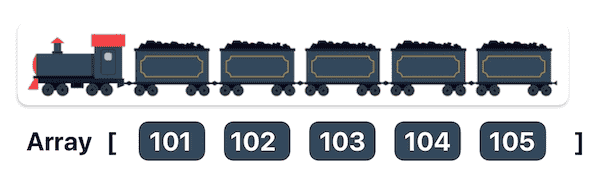
整列火车代表这个数组对象,每节车厢按照先后顺序排列。
索引和元素访问
因为数组是有序的,系统可以根据先后顺序定位数组的具体元素。这种定位机制被称为索引(Index)。
在 Swift(以及绝大多数编程语言)中,数组的索引是从 0 开始计算的,而不是 1。这意味着数组中的第一个元素对应的索引是 0,第二个元素是 1,以此类推。
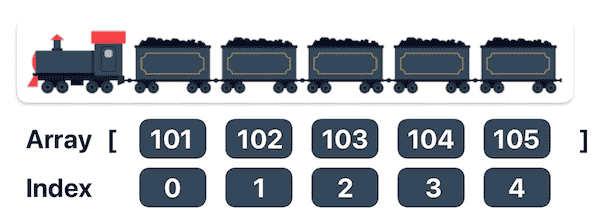
如果要访问数组中的特定元素,只需在数组名称后加上方括号,并在其中填入目标元素的索引值。
例如:
sayings[0]   // 101
sayings[1]   // 102
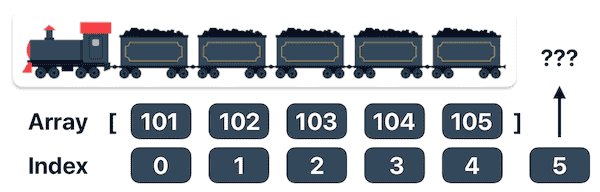
如果尝试访问一个超出数组有效范围的索引,会发生“索引越界”(Index Out of Range)的问题。因此,在访问数组时要小心,确保索引在有效范围内。
索引越界
例如,当数组只有 5 个元素时,合法的索引范围是 0 到 4。如果我们尝试访问 sayings[5],程序将无法找到对应的“车厢”,从而引发“索引越界”错误,导致应用崩溃。
操作数组
数组不仅支持静态定义,还支持添加、删除、修改元素等操作,还可以获取数组的长度。
提示:如果需要修改数组,必须使用 var 声明变量,而不是 let 常量。
1. 新增元素
可以使用 append 方法在数组末尾添加元素:
var num = [0, 1, 2]
num.append(3)   // [0, 1, 2, 3]
2. 删除元素
通过 remove(at:) 方法,可以删除数组中的指定元素:
var num = [0, 1, 2]
num.remove(at: 0)   // [1, 2]
3. 修改元素
直接使用索引对数组元素进行修改:
var num = [0, 1, 2]
num[1] = 4   // [0, 4, 2]
4. 统计数组长度
使用 count 属性获取数组的元素个数:
var num = [0, 1, 2]
num.count   // 3
使用数组显示名言
为了显示多个名言,我们可以把名言保存到数组中,然后通过索引访问并显示。
首先,在 ContentView 中创建一个 sayings 数组来存储名言,然后在 Text 视图中通过索引读取并显示对应的名言:
struct ContentView: View {
    let sayings = [
        "Slow progress is still progress.",
        "Difficult roads lead to beautiful destinations.",
        "Awake minds are the strongest.",
        "Long-term thinking wins over short-term tricks.",
        "Master one thing, and do it well."
    ]

    var body: some View {
        VStack {
            Text(sayings[0])
        }
        .padding()
    }
}
在这里,sayings[0] 表示数组中的第一个名言。
如果想要显示不同的名言,只需要修改方括号内的索引值:
Text(sayings[0]) // "Slow progress is still progress."
Text(sayings[1]) // "Difficult roads lead to beautiful destinations."
定义名言的索引
为了实现名言的动态切换效果,我们不能在把索引“写死”在 Text 视图中。
我们需要创建一个变量,单独保存当前显示的索引值。
在 SwiftUI 中,我们可以使用 @State 声明一个可变的索引:
@State private var index = 0SwiftUI 会监听 @State 包装的变量,当 index 发生变化时,SwiftUI 会重新渲染视图,并显示对应的名言。
接着,我们使用 sayings[index] 动态获取数组中的名言:
struct ContentView: View {
    @State private var index = 0
    let sayings = [
        "Slow progress is still progress.",
        "Difficult roads lead to beautiful destinations.",
        "Awake minds are the strongest.",
        "Long-term thinking wins over short-term tricks.",
        "Master one thing, and do it well."
    ]

    var body: some View {
        VStack {
            Text(sayings[index])
        }
        .padding()
    }
}
当 index 值发生变化时,Text 会显示不同的名言。
使用按钮控制索引
为了控制名言的切换,我们可以使用 Button 来修改 index 值。每次点击按钮,index 自动加 1:
Button("Next") {
    index += 1
}
当我们点击按钮时,index 的值会从 0 变成 1,触发视图刷新,Text(sayings[index]) 就会读取下一句名言。
然而,这里有一个潜在的问题:如果连续点击按钮,index 会递增到一个超出数组范围的值,这会导致数组索引越界错误。例如,当 index 达到 5(数组索引范围是 0 到 4)时,程序会崩溃。
为了防止数组索引越界,我们需要引入条件控制,确保 index 不会超出数组的范围。可以通过 if-else 语句来判断 index 是否小于数组的长度。
条件控制:if-else 语句
if-else 语句是 Swift 中最常用的条件分支语句,用于判断条件是否成立,并根据条件的真假执行不同的代码块。
基本结构:
if condition {
    // 当 condition 为 true 时执行的代码
} else {
    // 当 condition 为 false 时执行的代码
}
在 if 语句中,条件 condition 是一个布尔值(Bool 类型),可以是 true 或 false。当条件为 true 时,会执行 if 部分的代码,否则执行 else 部分的代码。
例如:
let age = 25
if age > 18 {
    print("Big Boy")
} else {
    print("Little Body")
}
这个示例中,age 的值是 25,if 语句判断 age > 18 是否成立,条件成立则输出 “Big Boy”。
如果不需要 else 部分的代码,可以省略:
if condition {
    // 当 condition 为 true 时执行的代码
}
使用条件控制索引范围
为防止数组索引越界,可以使用 if 语句来确保 index 不会超出数组的范围:
Button("Next") {
    if index < sayings.count - 1 {
        index += 1
    }
}
逻辑分析:sayings.count 的值为 5(共有 5 条名言),所以 sayings.count – 1 的值为 4,这也是数组的最后一个有效索引。
当 index 小于 4 时,点击按钮执行加 1 的操作是安全的;一旦 index 达到 4,条件不再满足,点击按钮就不会发生任何反应。
现在,代码已经实现了名言切换的功能:
struct ContentView: View {
    @State private var index = 0
    let sayings = [
        "Slow progress is still progress.",
        "Difficult roads lead to beautiful destinations.",
        "Awake minds are the strongest.",
        "Long-term thinking wins over short-term tricks.",
        "Master one thing, and do it well."
    ]
    var body: some View {
        VStack {
            Text(sayings[index])
            Button("Next") {
                if index < sayings.count - 1 {
                    index += 1
                }
            }
        }
        .padding()
    }
}
循环名言
如果我们希望在显示到最后一个名言后,点击按钮时重新显示第一个名言,从而实现名言的循环显示,可以通过 else 部分来实现:
Button("Next") {
    if index < sayings.count - 1 {
        index += 1
    } else {
        index = 0
    }
}
当点击按钮时,如果 index 达到数组的最后一个元素,index 会重置为 0,开始循环显示名言。
优化名言视图
现在,我们的名言轮播逻辑已经实现,但我们还可以进一步优化界面,使其更美观。
完整代码:
struct ContentView: View {
    @State private var index = 0
    let sayings = [
        "Slow progress is still progress.",
        "Difficult roads lead to beautiful destinations.",
        "Awake minds are the strongest.",
        "Long-term thinking wins over short-term tricks.",
        "Master one thing, and do it well."
    ]
    var body: some View {
        VStack(spacing: 10) {
            Text(sayings[index])
                .padding(20)
                .background(.white)
                .cornerRadius(10)
                .opacity(0.8)
            Button("Next") {
                if index < sayings.count - 1 {
                    index += 1
                } else {
                    index = 0
                }
            }
            .buttonStyle(.borderedProminent)
        }
        .padding()
        .background(
            Image("001")
        )
    }
}
在这个示例中,Text 视图添加了一个白色半透明背景和圆角,Button 按钮使用 .borderedProminent 样式,VStack 设置了背景图片。
知识点补充:在使用 background() 修饰符在处理图像背景时,其默认行为是尽可能填满当前视图所在的布局区域。在很多情况下,它能够自然地延伸覆盖至安全区域(Safe Area)。
现在,我们就实现了名言轮播的视图。
总结
通过本节课的学习,我们掌握了如何使用数组来存储多个名言,并通过 if 和 if-else 语句来实现名言的轮播。
我们还了解了数组的基本操作,如新增、删除、修改元素,以及如何防止数组索引越界。
这节课不仅讲解了名言轮播的功能实现,还结合了数组和条件语句的基本用法,帮助我们掌握了处理数据和控制程序流程的能力。
扩展知识 – 多重条件判断: if-else if-else 语句
在实际开发中,常常需要处理多个条件。比如,在某款游戏中,当积分等于 1 时触发事件 A,等于 2 时触发事件 B,等于 3 时触发事件 C,以此类推。
面对超过两个条件分支的场景,我们就需要使用 if-else if-else 语句来进行多重判断。
基本语法:
if conditionA {
    // 当 conditionA 为 true 时执行的代码
} else if conditionB {
    // 当 conditionB 为 true 时执行的代码
} else if conditionC {
    // 当 conditionC 为 true 时执行的代码
} else {
    // 所有条件均不满足时执行的代码
}
在这种情况下,程序会按照顺序检查条件,并执行第一个满足的条件。如果没有条件满足,就会执行 else 后面的代码。
在名言轮播中,我们也可以使用 if-else if-else 语句进行多重判断:
Button("Next") {
    if index == 0 {
        index += 1
    } else if index == 1 {
        index += 1
    } else if index == 2 {
        index += 1
    } else if index == 3 {
        index += 1
    } else if index == 4 {
        index = 0
    } else {
        index = 0
    }
}
当 index 为 0、1、2、3 时,每次点击按钮执行 index += 1,当 index 为 4(最后一个元素)时,将 index 重置为 0,实现循环。
else 分支用于兜底,防止出现非法值(例如 index 被错误修改)。
需要注意的是,这里使用的 == 表示判断”是否相等”,如果 if 语句判断 index 和某个数字相等,则返回 true 并执行后面的代码块。如果不相等,则继续下一个 if 语句的判断。
这种多重判断有利于在不同的条件场景中,执行不同的代码。