

在 Xcode 中如果想要查看断点的数组值,有以下几种方法:
通过调试打印
运行应用程序,在断电处停下后,打开 Debug Console(快捷键:⌘+Shift+Y)。
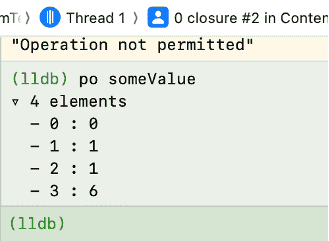
在(lldb)命令行处打印数组:
po 数组名称 // 查看所有数组对象
// 或者
print 数组名称  // 查看所有数组对象

po Array[0] // 查看单个数组元素
po Array.count  // 查看数组数量
po = print object,会调用对象的 description 或 CustomStringConvertible。
断电条件打印
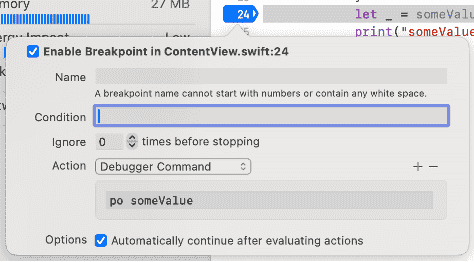
也可以在断电条件中打印,在断电上右击 → Edit Breakpoint → Actions,选择 Debugger Command,输入:
po myArray如果不希望程序暂停,可以勾选Automatically continue after evaluating。
总结
上述两种方法都可以在程序运行到断点时就会自动打印数组。
参考文章
1、Xcodeでデバッグしよう(入門:ブレークポイント、ウォッチポイント、LLDB、、、)
2、Xcode Debugger: view value of variable
3、Stepping through code and inspecting variables to isolate bugs