

Xcode调试真机时发现,滚动“存钱猪猪”主界面时,CPU明显过高,并且滚动过程中存在明显卡顿。
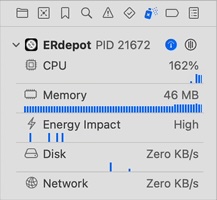
使用排查方法,当隐藏下面视图时,不再出现CPU过高以及卡顿的问题。
// 进度占比-方格
VStack(alignment: .leading, spacing:10) {
    Text(primaryBank.progressText)
    GridProgressView(rows: 5, columns: 10,progress: primaryBank.progress,filledColor: .blue)
}
// 存取记录
VStack(alignment: .leading,spacing: 10) {
    if let lastRecord{
       HStack {
           Caption2(text:"\(formattedDate(lastRecord.date))")
           Image(systemName: lastRecord.saveMoney ? "arrowtriangle.down.fill" : "arrowtriangle.up.fill")
           Caption2(text: lastRecord.amountText)
       }
    } else {
       Caption2(text:"No records available")
    }
}
起初猜测GridProgressView方格视图以及if-else语句导致的,后面测试发现和计算属性相关。
视图中的计算属性:
1、进度方格:primaryBank.progress和primaryBank.progressText是计算属性。
2、存取记录:lastRecord和lastRecord.amountText是计算属性,Image三元运算符也是计算视图。
当视图滚动时,会触发高频重绘,视图Body频繁刷新,因此CPU会上升。
解决方案:将计算属性改为body中的静态变量。
var body: some View {
    let progress: Double = primaryBank.progress
    let progressText = primaryBank.progressText
    let lastRecord = primaryBank.records?.max(by: { $0.date < $1.date })
    let lastRecordAmountText = "\(currencySymbol + " " + (lastRecord?.amount.formattedWithTwoDecimalPlaces() ?? ""))"
    let lastRecordDate = formattedDate(lastRecord?.date ?? Date())
    let lastRecordSaveMoneyIcon = lastRecord?.saveMoney ?? true ? "arrowtriangle.down.fill" : "arrowtriangle.up.fill"
    let lastRecordSaveMoneyColor =  lastRecord?.saveMoney ?? true ? AppColor.green : AppColor.red
    ...
}
SwiftUI中的计算属性以及三元运算符,全部改为在body中计算,这样可以解决CPU过高导致卡顿的问题。
重新使用Xcode调试应用,发现修改后的CPU在40%左右,不再出现超过100%的情况。
相关文章
1、SwiftUI的diff系统(Diffing System):https://fangjunyu.com/2025/05/03/swiftui%e7%9a%84diff%e7%b3%bb%e7%bb%9f%ef%bc%88diffing-system%ef%bc%89/
2、SwiftUI布局系统(layout system)之三步布局:https://fangjunyu.com/2024/12/20/swiftui%e4%b8%89%e6%ad%a5%e5%b8%83%e5%b1%80/
3、SwiftUI全屏视图fullScreenCover:https://fangjunyu.com/2025/01/02/swiftui%e5%85%a8%e5%b1%8f%e8%a7%86%e5%9b%befullscreencover/